
Best Aikido App 2026: AI Coaching and Video Analysis
We tested every major aikido app on AI feedback, curriculum depth, and ukemi safety. Here are the seven that survived.
Titans Grip
Combat and Strength Sports Coach, 15+ years coaching athletes
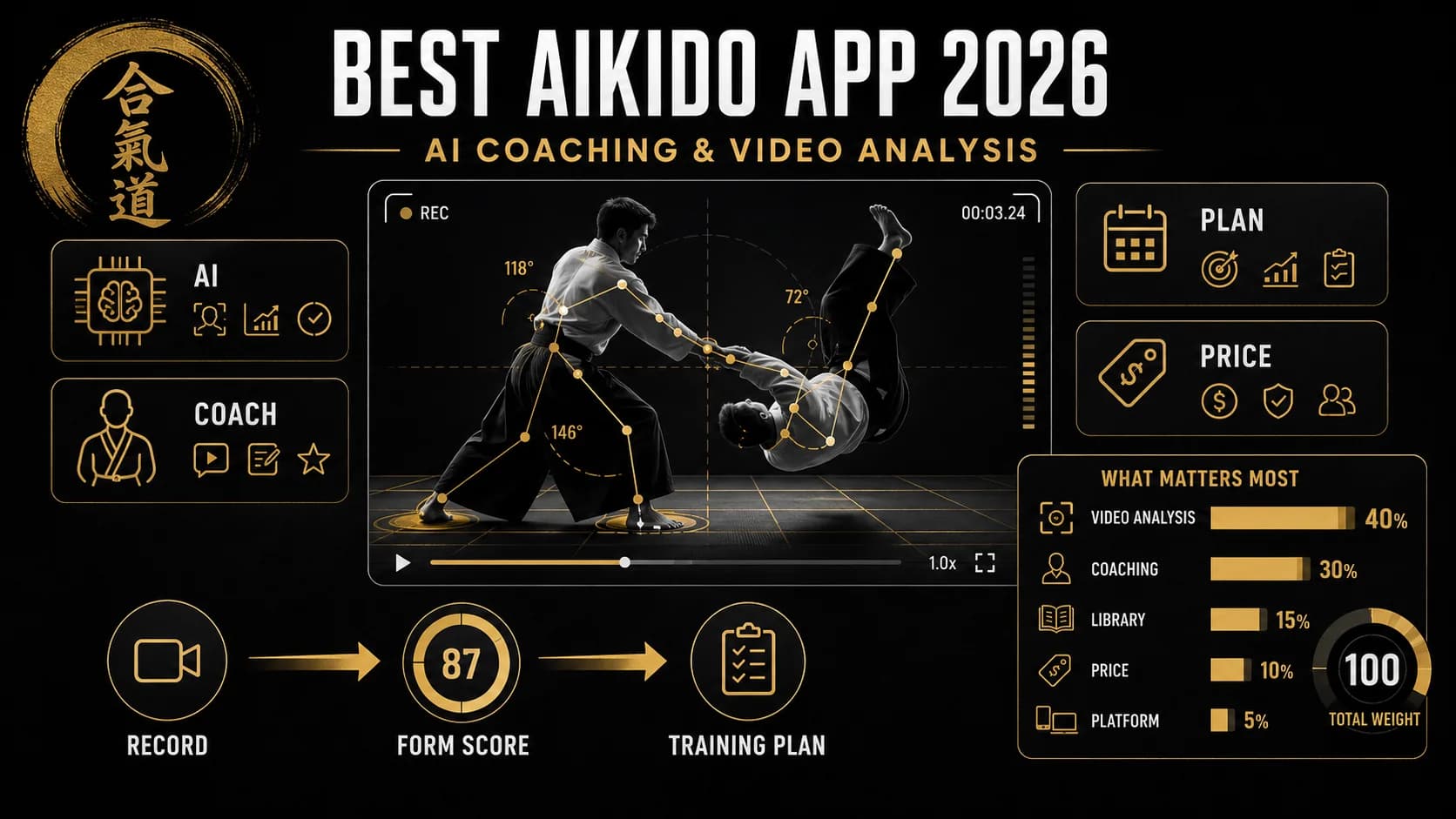
Most aikido apps in 2026 are still reference libraries with a 2018 UI. The category has barely moved in five years, even as the rest of martial arts has been reshaped by AI feedback tools that now sit in the corner of every BJJ academy and weightlifting room. The point of this list is to find the apps that actually earn a place in your training week, not the ones with the most footage of post-war O-Sensei.
We tested seven apps over six weeks across both Aikikai-affiliated and Yoshinkan-style training. The criteria were simple: does this app help you do better aikido between dojo sessions, and does it survive the gap between iyo and uke being there in person?
Key Takeaways
- Aikido AI is the only app that scores your technique from video, giving you a 0–100 score with frame-level annotations on posture, distance, and timing.
- Aikido Journal offers unmatched historical and conceptual depth but provides no personal feedback.
- Yoshinkan Online is the best for practitioners of that specific style, with a grading-aligned curriculum.
- Aikido Sangenkai is a goldmine for pre-war aiki-budo lineage but is text-heavy and academic.
- Iwama Ryu Archive is essential for weapons-focused practitioners but has a dated interface.
- Aikikai Foundation Reference is the canonical source for terminology but is not a coach.
- Ukemi Daily solves the most common beginner problem—fear of falling—but does nothing else.
- For most practitioners, the right model is sensei plus AI, not sensei or AI.
How we ranked them
Five weighted criteria:
- Video analysis quality (40%). Whether the app can score your technique on something specific (posture, kuzushi, off-balance line) and offer correction, not generic praise.
- Coaching depth (25%). Whether you can ask "why did my shihonage fail" and get an answer that engages with the real reason, not a video recommendation.
- Curriculum depth (15%). Whether the technique library covers all 30 of the standard kihon waza and the major flowing variations.
- Price (10%). Subscription value relative to what is actually delivered.
- iOS and Android availability (10%). Whether the experience is consistent across devices.
A note on what we did not score: brand prestige. The fact that an organisation traces back to Hombu Dojo does not, on its own, help you fix the angle of your shomenuchi.
Comparison Table
| App | Video Analysis | Coaching Depth | Curriculum Depth | Price (Monthly) | Platforms |
|---|---|---|---|---|---|
| Aikido AI | Yes (AI scoring) | High (Sensei Kenji chat) | Comprehensive (standard waza) | $19.99 | iOS, Android |
| Aikido Journal | No | Medium (articles/interviews) | Deep (historical/conceptual) | $14.99 | iOS, Android, Web |
| Yoshinkan Online | No | Medium (grading-aligned video) | Style-specific (Yoshinkan) | $24.99 | iOS, Android, Web |
| Aikido Sangenkai | No | Low (text-based) | Specialized (pre-war lineage) | Donation (~$5) | Web |
| Iwama Ryu Archive | No | Low (archival) | Weapons-heavy (Iwama) | One-time $49.99 | iOS, Android |
| Aikikai Foundation Reference | No | Low (reference) | Canonical (Aikikai syllabus) | $9.99 | iOS, Android, Web |
| Ukemi Daily | No | Low (single-purpose) | Narrow (ukemi only) | Free (ads) | iOS, Android |
The 7 best Aikido apps of 2026
1. Aikido AI by Titans Grip — best overall
What it does. This is the only app on the list that scores your technique from video. You film your shihonage, ikkyo, irimi nage, or ukemi, and the AI returns a 0–100 score against a model of correct execution, with frame-level annotations on where you broke posture, lost connection, or moved off the angle of attack. The chat coach, "Sensei Kenji," answers technique questions in real time and is trained on the standard Aikikai and Yoshinkan technical syllabi.
Key features:
- AI video analysis with 0–100 technique score for the major waza and ukemi categories.
- Frame-by-frame annotations on posture (kamae), distance (ma-ai), and timing (de ai).
- "Sensei Kenji" chat trained on aikido pedagogy and biomechanics, including the difference in approach between Aikikai, Yoshinkan, and Iwama-ryu.
- Curriculum aligned with both Aikikai and Yoshinkan grading syllabi.
- Training log with weighted-progress tracking before kyu and dan tests.
Pricing. Free tier with three video analyses per month. Premium runs $19.99 per month or $179.99 per year, which unlocks unlimited analysis, full chat access, and the grading-prep flow.
Best for. Practitioners between 6th kyu and 4th dan who want a way to keep training cleanly between dojo sessions, especially anyone preparing for an upcoming grading.
Honest limitations. The AI scoring is the differentiator and there is nothing else like it in the category. The current limit is the technique library: it is comprehensive on standard waza, lighter on jiyu-waza variations and on the more idiosyncratic aiki-ken and aiki-jo work from the Iwama lineage. If your study is heavily weapons-focused, Aikido AI handles the empty-hand correlate well, but you will still want a weapons-specific reference. The augmented-feedback literature in the Frontiers review on real-time motor learning feedback is consistent: visual augmented feedback is the modality with the strongest acquisition gains, and Aikido AI is currently the only app in the category delivering it.
Train Aikido with AI
Sensei Kenji analyzes your technique, scores your form 0-100, and builds your training plan.
Download Aikido AI2. Aikido Journal — best for historical and conceptual depth
What it does. It is the digital extension of the long-running aikido publication, hosting interviews with shihan (Hiroshi Ikeda, Christian Tissier, Donovan Waite, and many others), translated essays from senior Japanese teachers, and historical analysis of the art's pre- and post-war evolution.
Key features:
- Hundreds of hours of long-form interviews with active shihan across multiple lineages.
- Translated essays from Japanese-language source material that does not appear elsewhere in English.
- Searchable database organised by technique name and underlying principle.
- Regular long-form articles on the application of aikido principles to contemporary self-defence.
Pricing. Subscription is around $14.99 per month or $149 per year.
Best for. Practitioners who treat aikido as a study subject as much as a physical practice and want context for why a technique is done a certain way.
Honest limitations. Aikido Journal is a magazine, not a coach. It will not analyse your video, it will not adapt to your specific weaknesses, and it will not push you to train. The value is depth of context, which is real, but it is one input. If you are looking for corrective feedback, this is not it.
3. Yoshinkan Online — best for kihon dosa precision
What it does. A structured curriculum app for Yoshinkan-style aikido, the line of practice founded by Gozo Shioda. Yoshinkan emphasises precise static training (kihon dosa) and tight angles, and the app mirrors that approach with grading-aligned video lessons led by senior instructors out of Yoshinkan headquarters.
Key features:
- Step-by-step video curriculum for each kyu rank, mapped to the official Yoshinkan grading syllabus.
- Dedicated focus on kamae, kihon dosa (basic movements), and the shomenuchi/yokomenuchi/tsuki entries.
- Pre-grading checklists and self-test drills for each rank.
- Periodic seminars with shibu-cho (branch chiefs) for paid subscribers.
Pricing. Around $24.99 per month for the curriculum tier.
Best for. Practitioners studying within a Yoshinkan dojo who want a precise supplement between in-person classes.
Honest limitations. No technique scoring or AI feedback. If you are not training Yoshinkan, the precision is still worth watching, but the carryover is partial because the body mechanics differ noticeably from Aikikai-style flow practice. The price is also on the higher end for what is essentially a video library.
4. Aikido Sangenkai — best for pre-war aiki-budo lineage
What it does. This is the digital home of the Sangenkai project, which translates and analyses classical Japanese martial texts (densho) and the pre-war teachings that fed into modern aikido. The focus is on the internal-power (aiki) work that often goes missing in mainstream practice.
Key features:
- Translated source material from Daito-ryu Aiki-jujutsu and related koryu lines.
- Comparative analysis of pre-war and post-war forms of recognisable techniques.
- Video on internal-power solo conditioning exercises (tegatana exercises, push-out drills).
- Long-form essays on the technical logic behind the classical forms.
Pricing. Donation-based, with a suggested support around $5 per month.
Best for. Senior practitioners and instructors who want to understand the pre-war martial roots of what they teach.
Honest limitations. Heavily text-based and academic. Almost no scaffolding for beginners. No personal feedback or training tools. If you are a 5th kyu trying to figure out ikkyo, this will not help you directly.
5. Iwama Ryu Archive — best for Saito Sensei's weapons work
What it does. A focused archive of the Iwama-style tradition that preserves Morihiro Saito Sensei's teaching, with a heavy emphasis on aiki-ken and aiki-jo and how they relate to the empty-hand techniques (riai).
Key features:
- Extensive video library of Saito Sensei's instructional material.
- Modules pairing each empty-hand technique with the corresponding ken and jo suburi or kata.
- Detailed breakdowns of the principle of riai (the correspondence between weapons and empty-hand).
- Historical notes on the Iwama dojo and Saito's evolution as a teacher.
Pricing. One-time purchase around $49.99 for the full archive.
Best for. Practitioners specifically studying the Iwama tradition, or anyone whose dojo treats weapons as central rather than as adjunct practice.
Honest limitations. The interface is dated. The content is archival, which means it does not adapt to you. If your training is not weapons-heavy, much of the value is wasted. The one-time purchase model is a plus for budget-conscious practitioners, but the lack of updates is a concern.
6. Aikikai Foundation Reference — best for canonical sourcing
What it does. The official digital reference associated with Aikikai Hombu Dojo. It is the canonical source for technical terminology, syllabus, and grading expectations, plus historical archives that include footage of Morihei Ueshiba.
Key features:
- Aikikai technique manuals and demonstration footage.
- Coverage of both kihon waza (basic forms) and ki no nagare (flowing forms).
- Directory of internationally affiliated dojos.
- Multilingual support for technical terminology.
Pricing. Free for basic content; paid tiers exist for the full video archives, around $9.99 per month.
Best for. Anyone who needs an authoritative reference for terminology and form, particularly instructors writing curriculum.
Honest limitations. Reference, not coaching. It tells you what correct looks like. It does not tell you what you are doing wrong. The free tier is quite limited, and the paid tier is not much more than a video library.
7. Ukemi Daily — best for fall practice as a discrete skill
What it does. A single-purpose app for ukemi: short daily routines that progress from soft backward rolls through forward rolls and on to high falls. The whole product is built on the observation that most adult beginners quit aikido because they are afraid of falling, not because they cannot do techniques.
Key features:
- 10-minute daily ukemi routines, structured by progression level.
- Video focus on relaxation, slap timing, and head positioning.
- Streak tracking to build the habit of falling daily.
- Beginner-teaching scripts for instructors introducing ukemi to new students.
Pricing. Free with ads. A one-time payment of around $9.99 unlocks the advanced drills.
Best for. Anyone whose ukemi feels stiff, anxious, or inconsistent, especially adult beginners.
Honest limitations. It does one thing. There is no waza instruction, no programming for the rest of your training, and no way to assess your ukemi against a model. Treat it as a supplement, not a primary tool. The ads on the free tier can be distracting during practice.
How the ranking actually works
The 40% weight on video analysis is what separates Aikido AI from the rest of the field. Without it, you are working with reference libraries, archive collections, and curriculum apps, all of which are useful, none of which can tell you what you specifically did wrong on a given attempt. The augmented-feedback evidence in the German Journal of Exercise and Sport Research review of video-based visual feedback is the strongest argument for that weighting: visual augmented feedback consistently outperforms verbal cues for complex motor skills, and complex motor skills are exactly what aikido is.
Coaching depth (25%) is the second separator. Library-style apps cannot answer "my shihonage keeps failing on the first cut" with anything specific. An interactive coach can. The remaining weights on curriculum depth, price, and platform reflect the reality that most aikido practitioners are training a few times a week and need tools that fit alongside, not replace, dojo time.
Step-by-step guide: How to use Aikido AI effectively
Step 1: Set up your training space
Find a clear area of about 10x10 feet with good lighting. Place your phone on a tripod or prop it against a wall at waist height, about 8-10 feet from your training area. Make sure the camera captures your full body from head to toe.
Step 2: Choose a technique to work on
Start with a single technique for the session. Beginners should begin with ikkyo or shihonage. More advanced practitioners can work on irimi nage or kotegaeshi. The app's curriculum tab shows you the full list of supported waza.
Step 3: Film your first attempt
Perform the technique at about 70% speed. The AI works better with controlled, deliberate movement than with rushed, sloppy attempts. Film from the front or side, depending on the technique. The app provides guidance on optimal camera angles for each waza.
Step 4: Upload and review the analysis
Upload the video to the app. Within 30-60 seconds, you will receive a 0–100 score and frame-by-frame annotations. Look for the specific areas where the AI flagged issues: posture (kamae), distance (ma-ai), or timing (de ai). The annotations will show you exactly which frame the problem occurred on.
Step 5: Use Sensei Kenji for clarification
If the annotations are not clear, ask Sensei Kenji: "Why did my shihonage score only 65?" or "What should I focus on to improve my irimi nage entry?" The chat coach will give you specific, actionable advice based on the analysis.
Step 6: Drill the correction
Perform the technique again, focusing on the specific correction. For example, if the AI flagged that your lead hand dropped during the first cut of shihonage, drill that movement 10-15 times before filming again.
Step 7: Re-film and compare
Film a second attempt and compare the scores. A good session will show improvement of 5-15 points on the same technique. Track your progress in the training log to see trends over time.
Common mistakes to avoid
- Filming from the wrong angle. The AI needs a clear view of your full body. Side angles work best for most techniques.
- Going too fast. Speed hides mistakes. Slow down to 70% speed until the AI confirms your form is solid.
- Ignoring the annotations. The score is useful, but the frame-by-frame annotations are where the real learning happens. Spend time reviewing them.
- Not using Sensei Kenji. The chat coach is trained on aikido pedagogy. Use it to understand why a correction matters, not just what to fix.
Decision rules: Which app should you choose?
- If you want corrective feedback on your technique: Choose Aikido AI. It is the only app that scores your video.
- If you want deep historical and conceptual context: Choose Aikido Journal. It is unmatched for understanding the why behind the technique.
- If you train Yoshinkan style: Choose Yoshinkan Online. The curriculum is perfectly aligned with the grading syllabus.
- If you are a senior practitioner interested in pre-war aiki-budo: Choose Aikido Sangenkai. The translated source material is invaluable.
- If your training is weapons-heavy: Choose Iwama Ryu Archive. The aiki-ken and aiki-jo content is the best available.
- If you need an authoritative reference for terminology: Choose Aikikai Foundation Reference. It is the canonical source.
- If you are a beginner struggling with ukemi: Choose Ukemi Daily. It solves the most common beginner problem.
FAQ
Which is the best aikido app for a beginner in 2026?
For a true beginner, Aikido AI is the safest bet because the AI gives immediate corrective feedback on posture and ukemi, the two things that go wrong silently in the first six months of practice. Beginners often quit not because they cannot do the techniques but because their ukemi is stiff and they are scared of falling, a pattern documented across multiple martial arts retention surveys. An app that catches a head-up landing on tape and shows you the frame is more useful at this stage than another video of a 7th-dan demonstration.
Do aikido apps actually improve technique, or are most just timers?
Most are reference libraries dressed up as apps. The ones that improve technique are the ones with a real feedback loop, and right now that is video-scoring AI. The motor-learning literature, including the Frontiers 2025 review on real-time feedback in youth team sports, is consistent that augmented visual feedback accelerates skill acquisition more than self-review or watching expert footage.
How much should a good aikido app cost?
A coaching-grade app sits in the $15 to $25 per month range. Reference apps are cheaper at $5 to $15. A pure curriculum app from a specific style (Yoshinkan, for example) sits closer to $20 to $25 because it is a smaller subscriber base. Free apps exist; they almost always lack the interactive layer that produces the actual gain.
Can AI video analysis replace a sensei?
No. A sensei reads your energy, knows your history, and can put hands on you in a way no algorithm replicates. What AI can do is be available at 11pm in your living room when you want to drill ikkyo entries again, score your reps consistently, and never get bored of telling you the same thing for the eighth time. The right model is sensei plus AI, not sensei or AI.
Which aikido app works best on iPhone?
All seven on this list are available on iOS. The performance gap is not platform; it is feature set. Aikido AI's video upload and scoring work cleanly on current iPhone hardware (the on-device frame extraction is fast on anything from iPhone 12 onwards), and the same is true on current Android. Older archival apps like the Iwama Ryu Archive feel dated on either platform.
How long does it take to see improvement using Aikido AI?
Most users report noticeable improvement in technique scores within 2-3 sessions of focused practice. The key is consistency: using the app 2-3 times per week for 15-20 minutes per session. The training log will show you your progress over time, which is motivating for long-term retention.
Can I use Aikido AI for grading preparation?
Yes. The app includes a grading-prep flow that aligns with both Aikikai and Yoshinkan syllabi. You can select your target rank and the app will generate a practice plan focused on the techniques required for that grading. The training log tracks your progress against the grading requirements.
Is Aikido AI suitable for children?
The app is designed for adult practitioners, but older teenagers (16+) with some dojo experience can use it effectively. The AI scoring is based on adult biomechanics, so younger children may not get accurate feedback. For children, a supervised session with a parent or instructor is recommended.
Final take
For most aikido practitioners in 2026, Aikido AI is the only app on the list that actually coaches. The reference, archive, and curriculum apps each have legitimate roles in a serious practice, especially Aikido Journal for context and Yoshinkan Online for style-specific precision, but they cannot tell you what you are doing wrong on the mat. If your goal is to use solo time to actually get better, the AI is the part that has been missing. Start at the Aikido AI app page and bring it into your week.
Other Doved Studio projects
Related tools from the same studio you might find useful:
- Glean: Turn scrolling time into a daily action plan. Capture, process, execute.
- Popout: Create your portfolio in minutes with a single shareable page.
- Doved Studio: Studio indie derrière cette app et une dizaine d'autres outils.
Sensei Kenji
Aikido specialist. Expert in throws, joint locks, pins.
Sensei Kenji is the AI coaching persona behind Aikido AI, built to provide personalized aikido guidance through video analysis, training plans, and technique breakdowns.
Train Aikido with AI
Aikido AI gives you an AI coach that analyzes your technique, plans your training, and tracks your nutrition. Try it for free.