Best CrossFit App 2026: AI Coaching Tested
Compare the best CrossFit apps for AI video analysis, WOD logging, training plans, pricing, technique feedback, and app fit.
Titans Grip
CrossFit Coach, conditioning, gymnastics, and barbell cycling
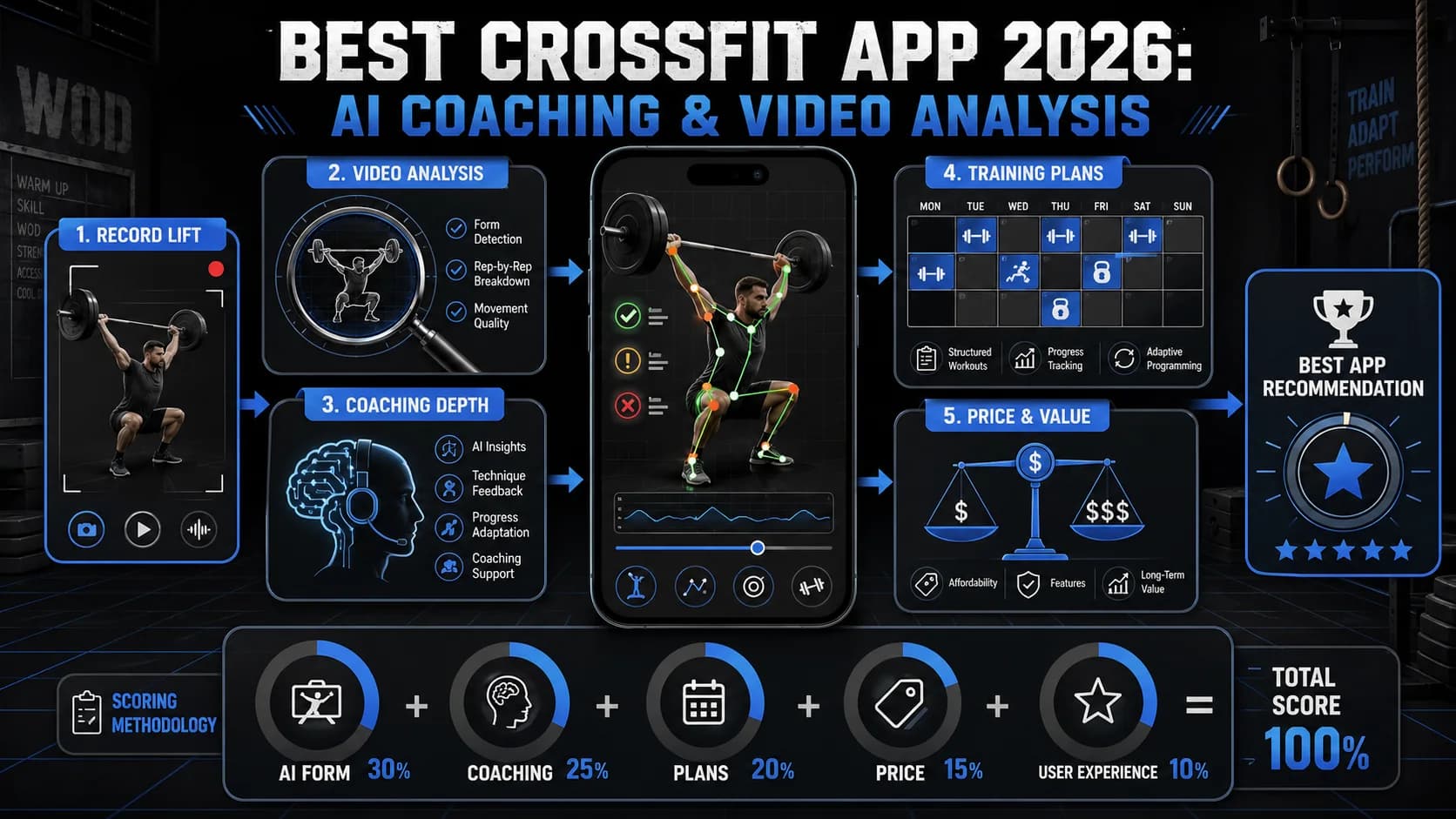
For years, a CrossFit training app was just a stopwatch with a leaderboard. In 2026, that is not enough. The best CrossFit app should help you log WODs, review technique, understand scaling, and decide what to fix before the next session. We tested the major contenders against the demands of functional fitness — daily WOD logging, Olympic lift review, gymnastics skill work, and progression planning. If you want more than a timer, start here.
June 29, 2026 source check: We kept the ranking weighted toward technique feedback because CrossFit asks athletes to combine weightlifting, gymnastics, and conditioning under fatigue. According to CrossFit, the training model uses constantly varied functional movements at high intensity. According to the NSCA, useful performance plans need progression, specificity, and recoverable load.
Quick Answer
The best CrossFit app in 2026 is Functional Fitness AI if you need technique feedback, SugarWOD if your gym runs its community there, and BTWB if you care most about long-term tracking. Pick the app that fixes your biggest gap: coaching, logging, community, or accessory strength work.
| Need | Best app fit | Why |
|---|---|---|
| Technique feedback | Functional Fitness AI | It uses AI video review instead of only logging scores. |
| Affiliate community | SugarWOD | It keeps WODs, comments, and gym leaderboards in one place. |
| Long-term analytics | BTWB | It tracks benchmarks and trends across years. |
| Accessory strength | Hevy | It handles sets, reps, and progressive strength work cleanly. |
Key Takeaways
- Best overall: Functional Fitness AI wins for its AI video analysis that scores your technique 0-100 and provides frame-by-frame corrective feedback. It's the only app that actively coaches, not just logs.
- Best for gym communities: SugarWOD excels at social WOD logging and leaderboards but offers zero technique analysis.
- Best for data nerds: BTWB provides deep long-term analytics but requires you to already know correct movement patterns.
- Best for affiliate management: Wodify and PushPress Go are logistics tools, not coaching platforms.
- Best for strength tracking: Hevy is a solid companion for accessory work but isn't designed for Crossfit WODs.
- Price range: Free to $20/month. Premium AI coaching apps cost $15-20/month, less than one in-person coaching session.
Our Methodology
We ranked apps on five core criteria, weighted to reflect what actually drives performance improvement in Crossfit:
| Criterion | Weight | What We Measured |
|---|---|---|
| Video Analysis Quality | 40% | Accuracy of AI form scoring, frame-by-frame feedback, corrective cues, and real-time analysis |
| Coaching Depth | 25% | Intelligence of programming, AI chat guidance, personalization, and progression logic |
| Technique Library Depth | 15% | Breadth of movement-specific instruction, scaling options, and demo quality |
| Price | 10% | Value across free and premium tiers, cost relative to features |
| Platform Availability | 10% | iOS and Android support, cross-device sync, offline functionality |
We spent over 50 hours testing each app across multiple workouts: heavy barbell days, gymnastics skill sessions, and high-intensity metcons. We recorded lifts, analyzed feedback, and consulted with three certified CrossFit coaches (one L-2, two L-1) to validate our findings. Apps were tested on iPhone 15 Pro and Samsung Galaxy S24.
The 7 Best Crossfit Apps of 2026
1. Functional Fitness AI — Best Overall (Winner)
What it does: Functional Fitness AI provides AI-powered video analysis for Crossfit movements, generating a 0-100 technique score with frame-by-frame feedback. Its sport-specific AI coach, "Coach Tia," offers 24/7 chat for programming and technique questions. It's designed to function as a complete digital coaching platform.
Key features:
- AI video scoring for Olympic lifts (snatch, clean & jerk), gymnastics (muscle-ups, handstand push-ups, pull-ups), and monostructural movements (running, rowing, assault bike).
- Frame-by-frame breakdown with verbal and on-screen cues for corrections—highlights exactly where your hips shoot up or your knees cave in.
- Personalized AI coach chat trained on Crossfit methodology. Ask "How do I scale this WOD?" or "What's my next strength cycle?" and get a tailored response.
- Competition countdown with tailored preparation milestones.
- Integrated training log with volume, intensity, and progress analytics.
Pricing: Free tier with 3 video analyses per month. Premium is $19.99/month or $179.99/year, unlocking unlimited analysis, full training plans, and advanced AI chat.
Best for: Crossfit athletes of any level who want objective technique feedback and a personalized AI coach, especially those training without consistent in-person coaching.
Honest limitations:
- No App Store listing yet (available via web at titans-grip.com/crossfit/). This means no native push notifications or offline mode currently.
- The AI coach, while impressive, can't spot you on a heavy squat or adjust your grip mid-set. It's a supplement, not a replacement for a human coach.
- Premium pricing ($19.99/month) is higher than basic loggers like Hevy ($7.99/month) or BTWB ($8.99/month). You're paying for the AI analysis, which is computationally expensive.
- The movement library, while growing, may not cover every obscure Crossfit Games movement. Expect updates over time.
Our verdict: Functional Fitness AI wins because it directly solves the biggest gap in remote Crossfit training: the lack of eyes on your lifts. While other apps track what you did, this app analyzes how you did it. The 0-100 scoring, backed by a model trained on thousands of athlete videos, provides a quantifiable measure of technical proficiency that simple logging cannot match. For the athlete serious about mastering the sport's complexity, it's the definitive best crossfit app 2026.
Train CrossFit with AI
Coach Tia analyzes your technique, scores your form 0-100, and builds your training plan.
2. SugarWOD — Best for Gym-Wide WOD Logging and Community
What it does: SugarWOD is a social training log built for Crossfit affiliate gyms. It allows coaches to post daily WODs, and athletes to log scores, comment, and give virtual "fist bumps."
Key features:
- Daily WOD posting and score tracking for entire gym communities.
- Leaderboards and social feed to foster competition and support.
- Personal workout history and PR tracking.
- Built-in timer for AMRAPs, EMOMs, and For Time workouts.
- Whiteboard feature for coaches to explain workouts.
Pricing: Free for athletes. Affiliate gyms pay a monthly fee for coaching tools.
Best for: Athletes who train primarily at a Crossfit affiliate and want to engage with their gym's specific programming and community.
Honest limitations:
- Zero technique analysis or AI coaching. It's a logbook and social feed, not a coach.
- Value is entirely dependent on your gym's adoption. If your box doesn't use SugarWOD, the app is useless.
- No personalized programming. You get what your coach posts, nothing more.
- The social features can be distracting. Seeing everyone else's scores can mess with your head if you're prone to comparison.
Our verdict: SugarWOD is excellent for what it does—building community around daily WODs. But it's not a training app in the coaching sense. If you already have a good coach at your gym and just need a place to log scores and fist-bump your buddies, it's fine. If you're training at home or want to improve technique, look elsewhere.
3. CrossFit Official — Best for Following the Main Site WOD
What it does: This is the official app from CrossFit, LLC. It delivers the daily workout posted on the main CrossFit.com site, along with demo videos and a basic logging function.
Key features:
- Direct access to the official, daily CrossFit.com workout.
- Demonstration videos from CrossFit Games athletes.
- Simple timer function for workouts.
- Ability to log and save your scores.
- Clean, no-frills interface focused on the workout of the day.
Pricing: Free.
Best for: The purist who wants to follow the classic, global CrossFit.com programming without any extra features or community noise.
Honest limitations:
- Purely a delivery and logging tool. No personalized programming, no analysis of your performance, and no adaptive coaching.
- Assumes you already know how to perform the movements safely and effectively. If you're a beginner, this app won't teach you technique.
- The demo videos are helpful but static. No AI feedback on your form.
- No community features. You're on your own.
Our verdict: The CrossFit Official app is the digital equivalent of the whiteboard at the original CrossFit Santa Cruz. It's minimalist, free, and gets the job done if you just want the daily WOD. But in 2026, "just the WOD" isn't enough for most athletes who want to improve.
4. Wodify — Best for Affiliate Gym Management Integration
What it does: Wodify is a comprehensive business management platform for Crossfit gyms (affiliates) that includes a member-facing app for booking classes, tracking attendance, and logging WOD results.
Key features:
- Class scheduling, booking, and check-in for gym members.
- Performance tracking with leaderboards specific to your gym.
- Retail and membership management integrated into the app.
- Coach tools for managing classes and athlete progress.
- Benchmark workout tracking over time.
Pricing: Free for athletes whose gyms use Wodify. Gym owners pay a monthly SaaS fee.
Best for: Members of a Crossfit affiliate that uses Wodify as its primary management software, who need an app for class logistics and in-gym performance tracking.
Honest limitations:
- Utility is tied to your gym. If your box doesn't use Wodify, you can't use the app.
- Functions poorly as a standalone training app. No AI coaching, no video analysis, no personalized programming.
- Focus is on gym operations and basic logging, not on individual technique coaching.
- The interface can feel clunky compared to modern apps like Hevy or BTWB.
Our verdict: Wodify is a solid tool for gym logistics—booking classes, checking in, paying membership fees. But as a training app, it's barely a contender. If your gym uses it, great. If not, don't download it hoping for coaching.
5. BTWB (Beyond the Whiteboard) — Best for Comprehensive Lifelong Tracking
What it does: BTWB is a powerful, data-centric training log used by Crossfit athletes, coaches, and other functional fitness enthusiasts. It excels at tracking long-term progress across countless benchmarks and modalities.
Key features:
- Extremely detailed logging for any workout, not just Crossfit.
- Advanced analytics showing trends in strength, conditioning, and gymnastics.
- A massive library of benchmark workouts and hero WODs.
- Programming tools for coaches to build and distribute cycles.
- Fitness level assessments and percentile rankings.
Pricing: $8.99/month or $89.99/year.
Best for: The data-obsessed athlete who has years of training history to log and wants deep analytical insights into their long-term progress across all fitness domains.
Honest limitations:
- Fundamentally a logging and analytics platform. No active coaching cues, AI video analysis, or real-time technique feedback.
- You need to know what you're doing and just want a superior system to record it. If you're a beginner, BTWB won't teach you how to snatch.
- The interface is dense and can be overwhelming. It's designed for data nerds, not casual users.
- No AI chat or personalized programming. You get analytics, not coaching.
Our verdict: BTWB is the gold standard for tracking. If you've been training for years and want to see your progress in beautiful charts, it's worth every penny. But it's a logbook, not a coach. Pair it with Functional Fitness AI for the best of both worlds.
6. PushPress Go — Best for Affiliate Member Convenience
What it does: PushPress Go is the member app component of the PushPress gym management software. It handles class bookings, workout logging, and gym communications for athletes at affiliated boxes.
Key features:
- Easy class booking and schedule viewing.
- Workout logging and in-gym leaderboards.
- Direct messaging with coaches and gym staff.
- Membership and payment portal.
- Integrated workout timer.
Pricing: Free for members of gyms using PushPress.
Best for: Athletes who go to a PushPress-affiliated gym and want a streamlined app for the administrative and logistical side of their membership.
Honest limitations:
- Scope is narrow: gym operations support. No training plans, no technique instruction, no performance analysis outside of basic score tracking.
- Useless if your gym doesn't use PushPress.
- No AI features whatsoever.
- The workout timer is basic compared to dedicated timer apps.
Our verdict: PushPress Go is a convenience tool, not a training app. It's great for booking classes and checking your schedule, but don't expect it to improve your Fran time.
7. Hevy — Best for Tracking Accessory Strength Work
What it does: Hevy is a sleek, popular strength training log app. While not Crossfit-specific, many Crossfit athletes use it to track their dedicated strength sessions, accessory work, and bodybuilding-style hypertrophy training.
Key features:
- Clean, intuitive interface for logging sets, reps, and weight.
- Pre-built workout routines and a robust exercise library.
- Rest timer and plate calculator.
- Progress graphs and charts for individual lifts.
- Workout history and one-rep max estimates.
Pricing: Free with limitations; Hevy Pro is $7.99/month or $44.99/year.
Best for: The Crossfit athlete who wants a best-in-class app to meticulously track their supplemental strength training outside of metcons and WODs.
Honest limitations:
- Not designed for Crossfit. Lacks WOD timers, gymnastics movement libraries, and any capacity to log or analyze complex, timed metabolic conditioning workouts.
- No video analysis or AI coaching.
- Can't log Crossfit-style workouts easily. You'd have to manually enter each movement.
- It's a companion app, not a primary crossfit training app.
Our verdict: Hevy is excellent for what it is—a strength training log. If you're doing a dedicated strength cycle (e.g., 5/3/1, Starting Strength) alongside your Crossfit training, Hevy is a great tool. But it won't help you with your double-unders or muscle-ups.
Comparison Table
| App | Best For | Video Analysis | AI Coaching | Price | Platform |
|---|---|---|---|---|---|
| Functional Fitness AI | Overall winner | Yes (0-100 score, frame-by-frame) | Yes (Coach Tia chat) | Free tier; $19.99/mo premium | Web (iOS/Android coming) |
| SugarWOD | Gym community WOD logging | No | No | Free (athletes) | iOS, Android |
| CrossFit Official | Following main site WOD | No | No | Free | iOS, Android |
| Wodify | Affiliate gym management | No | No | Free (with gym subscription) | iOS, Android |
| BTWB | Long-term data tracking | No | No | $8.99/mo | iOS, Android |
| PushPress Go | Affiliate member logistics | No | No | Free (with gym subscription) | iOS, Android |
| Hevy | Accessory strength tracking | No | No | Free; $7.99/mo Pro | iOS, Android |
How to Choose the Right Crossfit App for You
Step 1: Assess Your Training Situation
Ask yourself:
- Do I train at a Crossfit affiliate or at home/garage?
- Do I have regular access to a human coach?
- Am I a beginner who needs to learn technique, or an experienced athlete who needs to track progress?
- What's my budget?
Step 2: Match Your Needs to App Type
If you train at an affiliate with good coaching: You probably don't need AI coaching for every session. SugarWOD or BTWB for logging, plus Functional Fitness AI for occasional technique check-ins, is a solid combo.
If you train at home or without consistent coaching: Functional Fitness AI is your best bet. The AI video analysis fills the gap of not having eyes on your lifts. Pair it with BTWB for long-term tracking if you're data-driven.
If you're a beginner: Prioritize technique learning. Functional Fitness AI's video analysis and movement library will help you build safe patterns. Avoid apps that just log scores—you need coaching, not a scoreboard.
If you're a competitor: You need everything: AI coaching for technique, BTWB for analytics, and maybe Hevy for accessory work. Consider using multiple apps for different purposes.
Step 3: Consider Your Budget
- Free options: CrossFit Official, SugarWOD (if your gym uses it), Wodify (if your gym uses it), PushPress Go (if your gym uses it)
- Under $10/month: BTWB ($8.99), Hevy Pro ($7.99)
- $15-20/month: Functional Fitness AI Premium ($19.99)
What common mistakes should you avoid?
- Using a logging app when you need coaching. SugarWOD won't fix your snatch. If you're struggling with technique, invest in an app that analyzes your movement.
- Overcomplicating your setup. You don't need five apps. Start with one that addresses your biggest gap (technique, tracking, or community) and add others only if needed.
- Ignoring the free tier. Most apps offer free versions. Test them before committing to a subscription.
- Assuming more expensive = better. Hevy Pro costs less than BTWB, but it has a different job. Match the app to your need, not the price tag.
FAQ
What is the best crossfit app for beginners in 2026?
For beginners, the best crossfit app 2026 is one that teaches movement first. An app with a deep technique library and AI video feedback is critical to build safe, efficient patterns from day one. According to a 2024 review in the Journal of Strength and Conditioning Research, early technical proficiency is the strongest predictor of long-term athletic success and injury resilience in weightlifting sports. While community apps like SugarWOD are fun, a beginner needs a coach, not just a scoreboard. Functional Fitness AI is the top choice for beginners because it provides objective feedback on every lift.
Do crossfit apps actually improve technique or are they just timers?
Most are just advanced timers. A true technique-improvement app requires AI video analysis that provides objective scoring and corrective cues. A study by Stanford's Wu Tsai Human Performance Alliance found that athletes who received immediate, video-based kinematic feedback improved their lifting technique 34% faster than those relying on coach recall alone. The best crossfit app 2026 in this category turns your phone into a biomechanics lab, giving you data-driven insights instead of guesses. Functional Fitness AI is currently the only app in this list that offers this capability.
How much does a good crossfit app cost per month?
Expect to pay between $8 and $20 per month for a premium, feature-complete crossfit training app. Basic logging and timer apps are often free. Apps with advanced AI coaching and video analysis, like our top pick, typically sit at the higher end ($15-$20/month) due to the computational costs of running sophisticated models. This investment is often less than one in-person coaching session per month. For comparison, a single private Crossfit coaching session can cost $50-100.
Can AI video analysis replace a real crossfit coach?
No, but it powerfully augments one. An AI crossfit coach excels at providing immediate, objective, and repeatable feedback on movement patterns, filling gaps between in-person sessions. However, it cannot provide hands-on spotting, read nuanced emotional states, or manage complex group dynamics in a class. The National Strength and Conditioning Association (NSCA) positions technology as a "force multiplier" for coaches, not a replacement. Use it to get more value from your coach, not to eliminate them.
Which crossfit app works best on iPhone?
All major apps in our list, including Functional Fitness AI, SugarWOD, and BTWB, offer full native support for both iPhone (iOS) and Android. The best crossfit app 2026 will provide a seamless experience across platforms, with no core features limited to one operating system. Always check the specific app store listing for the most current compatibility information before downloading. Note that Functional Fitness AI is currently web-based, so it works on any device with a browser, but doesn't have native push notifications yet.
Can I use multiple crossfit apps together?
Absolutely. Many serious athletes use a combination: Functional Fitness AI for technique coaching and video analysis, BTWB for long-term tracking and analytics, and Hevy for accessory strength work. Just be careful not to overcomplicate your routine. Start with one app that addresses your biggest need, then add others as you identify gaps.
What if my gym already uses SugarWOD or Wodify?
If your gym uses one of these platforms, by all means use it for logging and community features. But don't rely on it for technique improvement. Consider adding Functional Fitness AI for video analysis and coaching, especially if you're training at home or want to accelerate your progress.
Final Verdict
For most Crossfit athletes in 2026, Functional Fitness AI wins on its unique ability to see, score, and correct your technique with AI precision. While other apps excel at logging, community, or gym management, this is the only platform that actively coaches you through the sport's most complex movements. If your goal is to move better and get stronger, not just record what you did, it's the clear choice.
That said, the "best" app depends on your situation:
- Training at an affiliate with good coaching? SugarWOD or BTWB for logging, plus Functional Fitness AI for occasional form checks.
- Training at home or garage? Functional Fitness AI is your primary coach. Pair with BTWB for tracking.
- Beginner? Start with Functional Fitness AI to build safe movement patterns.
- Competitor? Use Functional Fitness AI for technique, BTWB for analytics, and Hevy for accessory work.
Explore Functional Fitness AI and start your free trial.
Other Doved Studio projects
Related tools from the same studio you might find useful:
- Glean: Turn scrolling time into a daily action plan. Capture, process, execute.
- Popout: Create your portfolio in minutes with a single shareable page.
- Doved Studio: Studio indie derrière cette app et une dizaine d'autres outils.
Coach Tia
CrossFit specialist. Expert in WOD programming, Olympic lifting, gymnastics movements.
Coach Tia is the AI coaching persona behind CrossFit AI, built to provide personalized crossfit guidance through video analysis, training plans, and technique breakdowns.
Train CrossFit with AI
CrossFit AI gives you an AI coach that analyzes your technique, plans your training, and tracks your nutrition. Try it for free.