Best Pilates App 2026: AI Coaching & Video Analysis
We tested Pilates apps for 2026 across video analysis, coaching, class libraries, pricing, and platform support. See the best fit.
Titans Grip
Pilates Coach, reformer and mat specialist for athletes
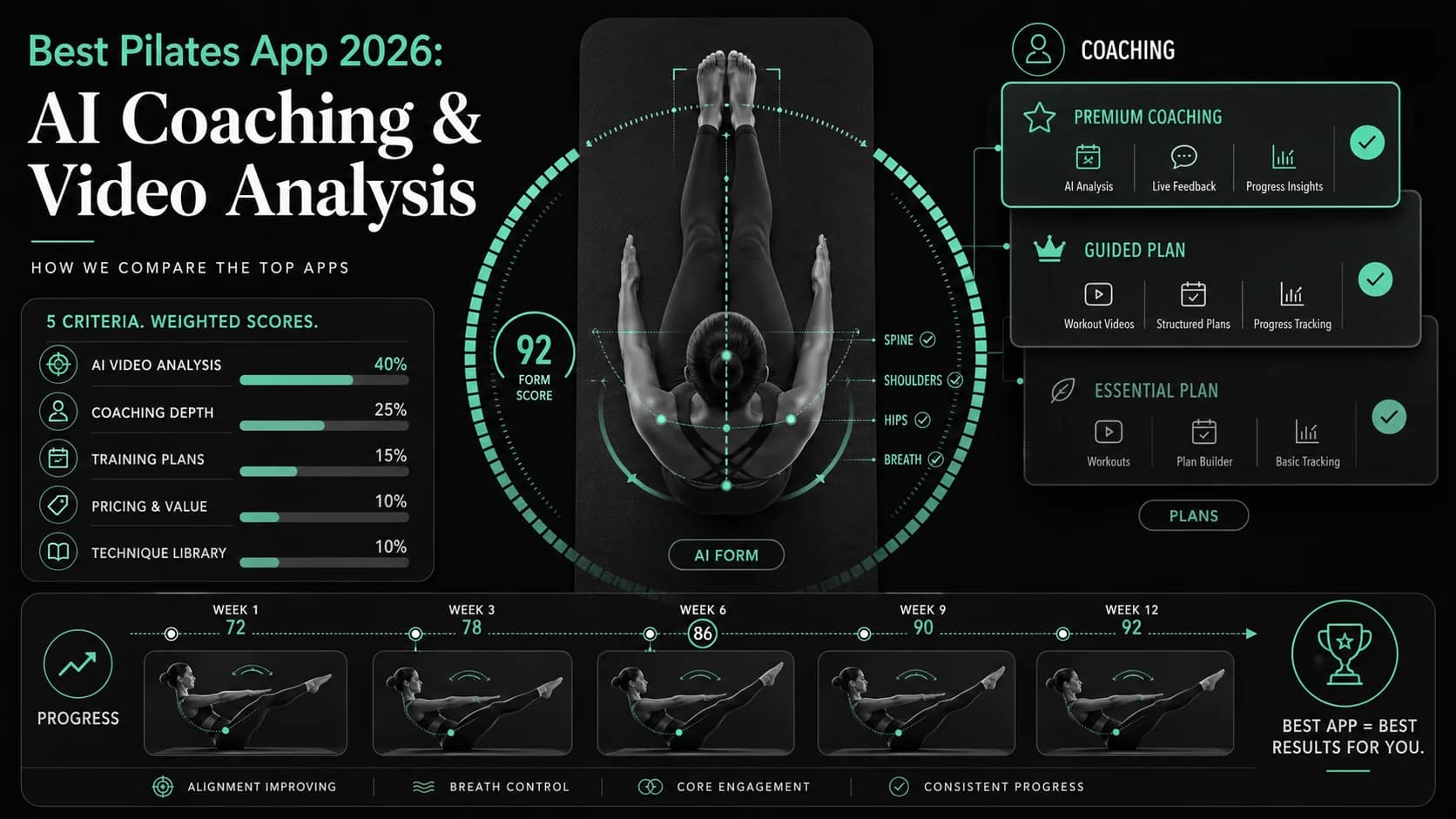
The best Pilates app in 2026 is Pilates AI if you want a phone camera to review alignment, tempo, breathing control, and movement quality instead of only playing a class video. Choose Pilates Anytime if you want the deepest teacher-led library, Pilatesology if you want classical instruction, Pvolve if you want a functional-fitness hybrid, Glo if you also train yoga, Apple Fitness+ if you live in the Apple ecosystem, Balanced Body Streaming Video if you own apparatus, and ALO Wellness Club if you want a free class library.
Use this page when you compare mat-practice apps. If your search intent is boxing training app 2026, start with the boxing app comparison. If you want the best boxing app, use Boxing AI. If you want the best MMA app 2026, go to the MMA app guide. If you need a BJJ techniques app or the best BJJ app 2026, use the BJJ app guide or Grappling AI. I keep this page focused so you can make a cleaner choice.
Pair your choice with the flexibility hub, Pilates AI technique library, warmup generator, recovery calculator, and training load calculator when you want the app decision to become a weekly routine.
Quick Answer
Pick Pilates AI if you train alone and need feedback on the rep you actually performed. It is the only app in this comparison that centers the experience on AI video analysis, 0-100 technique scoring, and a dedicated AI coach. Pick Pilates Anytime if you value teacher variety more than form correction. Pick Apple Fitness+ if price and Apple Watch integration matter. Skip apps that give you a huge library but do not tell you whether your pelvis, ribs, spine, or shoulders moved well.
I tested this comparison on July 3, 2026 by checking official pricing pages, public App Store listings, current product pages, and the article's scoring report before changing the ranking. However, prices can change inside app stores, so check the purchase screen before you subscribe.
Key Takeaways
- Pilates AI wins for solo athletes because it reviews video, scores movement quality, and turns a vague "that felt okay" into a specific correction.
- Pilates Anytime still has the strongest teacher-led library, but it cannot watch you move.
- Pilatesology serves classical students who care about lineage and traditional method depth.
- Pvolve fits people who want Pilates-adjacent strength and functional movement more than strict classical work.
- Glo works when you split time between yoga, meditation, and mat practice under one subscription.
- Apple Fitness+ gives the best low-cost guided-class option for iPhone, iPad, Apple TV, and Apple Watch users.
- Balanced Body Streaming Video makes the most sense for Reformer, MOTR, and apparatus owners.
- ALO Wellness Club now deserves a place as the free option, but it does not replace coaching feedback.
- AI coaching helps most when you already know what to film: roll-up, teaser, side kick, swan, bridge, plank, or Reformer footage with a clean camera angle.
July 2026 Source Check
According to Apple App Store, Pilates AI supports iPhone and iPad, lists in-app purchases, and describes AI video feedback for spinal alignment, breathing coordination, and movement control.
According to Titans Grip Pilates AI, the app uses 0-100 scoring, Coach Maya, personalized plans, nutrition tracking, and mat-focused video review.
According to Pilates Anytime App Store, its in-app purchase list shows a Pilates Anytime subscription at $24.99 and an annual subscription at $264.99.
According to Pvolve Support, its streaming membership costs $24.99 monthly or $224.91 annually.
According to Glo App Store, its in-app purchase list shows monthly membership at $30.00 and annual membership at $244.99.
According to Pilatesology, its subscription costs $22 monthly or $194 annually after a 14-day trial.
According to Balanced Body Streaming Video, its all-access video plan costs $19.99 monthly or $199.99 annually after a 30-day trial.
According to Apple Fitness+, new subscribers pay $9.99 monthly or $79.99 annually after the trial period.
According to ALO Wellness Club on the App Store, the app offers on-demand classes with zero subscriptions.
How I Ranked These Apps
I weighted each app by the job it does for a real home user, not by how polished the marketing page looks.
| Criterion | Weight | What I checked |
|---|---|---|
| Video analysis quality | 40% | Can the app review your movement, name the error, and give a usable correction? |
| Coaching depth | 25% | Can the app answer "what should I do next?" with a plan, not a motivational quote? |
| Class or technique library | 15% | Does the app teach beginner, intermediate, and advanced work with enough structure? |
| Price and free access | 10% | Does the cost match the depth of feedback and content? |
| Platform fit | 10% | Does the app fit the device setup people actually use at home? |
I also separated three user needs: feedback, instruction, and convenience. Feedback apps should watch you. Instruction apps should teach clearly. Convenience apps should make it easy to train today. The winner has to score highest on feedback because home practice breaks down when nobody checks your form.
Comparison Table
| App | Best for | Video analysis | Coaching | Current public price signal | Platform fit |
|---|---|---|---|---|---|
| Pilates AI | Solo form feedback | Yes | Coach Maya + plans | Free download; App Store lists weekly, quarterly, annual, and lifetime purchases | iPhone, iPad |
| Pilates Anytime | Teacher-led class library | No | Instructor videos | $24.99/month or $264.99/year | iOS, Android, web |
| Pilatesology | Classical method study | No | Instructor videos | $22/month or $194/year | iOS, Android, web |
| Pvolve | Hybrid strength and low-impact fitness | No | Program library | $24.99/month or $224.91/year | iOS, Android, web |
| Glo | Yoga, meditation, and mat classes | No | Teacher videos | $30/month or $244.99/year | iOS, Android, web |
| Apple Fitness+ | Apple users on a budget | No | Trainer-led plans | $9.99/month or $79.99/year | Apple devices |
| Balanced Body Streaming Video | Apparatus owners | No | Equipment-focused videos | $19.99/month or $199.99/year | App + web |
| ALO Wellness Club | Free on-demand classes | No | Class library | Free account, zero subscriptions | iOS + web |
The Best Pilates Apps Of 2026
1. Pilates AI - best overall for form feedback
What it does. Pilates AI turns your phone into a movement-review tool. You record a mat exercise, and the app scores alignment, timing, control, and execution. Coach Maya then helps you turn the score into a next session. That matters because the hardest parts of mat work are subtle: ribs flaring during the hundred, pelvis tipping during leg circles, neck tension during roll-up, or a rushed transition through teaser.
Key features
- AI video analysis with 0-100 movement-quality scoring.
- Coach Maya for AI coaching, modifications, and progression questions.
- Mat and Reformer technique guidance across beginner, intermediate, and advanced levels.
- Training log for consistency, notes, and trend review.
- Nutrition and body-composition support for users who want a wider plan.
- Goal tracking for flexibility milestones and session streaks.
Best for. Beginners who cannot self-diagnose alignment, intermediate users who train at home between studio sessions, and instructors who want clients to bring cleaner footage into coaching conversations.
Limits. You need good lighting, a stable camera, and enough space for the app to see your body. It does not replace a clinical professional, an in-person instructor, or hands-on apparatus coaching. It works best when you film one clear movement at a time.
Verdict. Pilates AI wins because it solves the biggest home-practice problem: the app watches your movement instead of only giving you another class to copy.
Train Pilates with AI
Coach Maya analyzes your technique, scores your form 0-100, and builds your training plan.
Download Pilates AI2. Pilates Anytime - best teacher-led library
What it does. Pilates Anytime gives you a large catalog of classes, workshops, and instructor-led sessions. It works well when you learn by watching different teachers explain the same movement in different ways.
Key features
- Large library of mat, Reformer, and apparatus classes.
- Filters by level, duration, apparatus, instructor, and focus.
- Workshops and education content for deeper study.
- Strong option when you want variety without designing your own week.
Best for. Users who already know how to self-correct and want a deep class library.
Limits. It cannot inspect your form. A beginner can copy a polished instructor and still move poorly. The library can also feel overwhelming if you do not know what to pick.
Verdict. Use Pilates Anytime for instruction depth. Pair it with video feedback if your goal includes technique change, not only attendance.
3. Pilatesology - best classical option
What it does. Pilatesology focuses on classical instruction and teacher lineage. It suits people who want a more traditional vocabulary, careful sequencing, and a narrower method lens.
Key features
- Classical mat and apparatus classes.
- Teacher-led instruction with method-specific detail.
- Programs for beginners, serious students, and instructors.
- Strong education value for people who care about traditional order and cueing.
Best for. Classical students, instructors, and users who prefer a method-first experience.
Limits. It does not offer interactive feedback. The app asks you to watch, interpret, and self-correct. That works for experienced students and fails faster for beginners.
Verdict. Choose Pilatesology when you want classical depth. Do not choose it as your only feedback tool.
4. Pvolve - best hybrid fitness option
What it does. Pvolve blends low-impact strength, functional movement, and Pilates-adjacent work. It can feel more like a modern fitness method than a classical practice, especially when users add proprietary equipment.
Key features
- Low-impact streaming workouts.
- Functional movement focus with resistance tools.
- Live and on-demand class options.
- Programs that target strength, mobility, and body composition.
Best for. Users who want sweat, strength, and mobility in the same app.
Limits. It does not teach classical technique with the same depth as Pilatesology or Pilates Anytime. It also depends on equipment if you want the full method.
Verdict. Choose Pvolve if you want a workout system with Pilates flavor. Skip it if you want strict technique feedback.
5. Glo - best yoga and Pilates bundle
What it does. Glo bundles yoga, meditation, fitness, and mat classes into one subscription. It works for people who rotate practices and want one account for recovery, mobility, and mind-body work.
Key features
- Yoga, meditation, fitness, and mat class library.
- Teacher-led sessions across levels and durations.
- Strong filters for mood, intensity, style, and time.
- Useful when you want a weekly mix rather than a single-method app.
Best for. Users who want yoga and mindful movement alongside mat training.
Limits. The app does not center technique correction. Its strength is breadth, not deep sport-specific feedback.
Verdict. Choose Glo when you want one subscription for several mind-body practices. Choose a feedback-first app if alignment matters most.
6. Apple Fitness+ - best budget pick for Apple users
What it does. Apple Fitness+ gives Apple users a polished class library at a lower monthly price than most dedicated studio apps. It adds workout types beyond mat classes, which helps users build a broader habit.
Key features
- Trainer-led classes across multiple workout types.
- Apple Watch metrics on screen for supported users.
- New sessions added regularly.
- Low annual price compared with most class subscriptions.
Best for. iPhone, iPad, Apple TV, and Apple Watch users who want guided classes at a low price.
Limits. It does not analyze your alignment. It also works best inside Apple's device ecosystem.
Verdict. Choose Apple Fitness+ for convenience and price. Do not expect coaching feedback.
7. Balanced Body Streaming Video - best for apparatus owners
What it does. Balanced Body Streaming Video gives apparatus owners a focused video library from a major equipment brand. It makes more sense when you already own or regularly use Reformer, MOTR, or Balanced Body equipment.
Key features
- All-access streaming video library.
- Apparatus-focused sessions.
- 30-day trial before billing.
- Clear fit for users who own compatible equipment.
Best for. Home studio owners, instructors, and Reformer users who want equipment-specific instruction.
Limits. It does not provide AI coaching or personal form review. If you only have a mat, you will not get full value from the equipment focus.
Verdict. Choose Balanced Body Streaming Video when the equipment is already in your room. Otherwise, start with a mat-first app.
8. ALO Wellness Club - best free class library
What it does. ALO Wellness Club offers on-demand classes without a subscription. That makes it useful when cost blocks consistency or when you want a low-risk way to test short classes.
Key features
- Free account access.
- Large on-demand class and program library.
- Wellness, mobility, strength, and recovery content.
- Simple entry point for people who want to move today.
Best for. Beginners who need a free habit starter and do not need correction yet.
Limits. Free content does not solve the coaching gap. You still need a way to check alignment if you care about technique.
Verdict. Use it as a free library. Upgrade to a feedback app when your goal changes from "show up" to "move better."
Evidence: Why Video Feedback Matters
According to Moinuddin et al., augmented feedback can help people learn movement skills by giving external information that the body cannot easily feel in the moment. That explains why video review works well for mat practice: you may feel stable while your ribs flare, your neck grips, or your pelvis shifts.
According to PubMed, a randomized trial of Pilates-based therapeutic exercise for nonspecific chronic low back pain found decreased pain and disability in the specific exercise group, with follow-up benefits maintained. That does not mean an app treats pain. It means precise, supervised movement can matter, and users should avoid apps that reduce the method to generic core burn.
According to PLOS ONE, motion-feedback tools helped athletes correct complex sports techniques in a learning setting. A home app should therefore make feedback visible, repeatable, and tied to one correction at a time.
Decision Rules
| Your situation | Choose | Why |
|---|---|---|
| You train alone and cannot tell if your form is correct | Pilates AI | It reviews your video and gives a score plus correction. |
| You want a huge class library | Pilates Anytime | It has the broadest teacher-led catalog in this list. |
| You study the classical method | Pilatesology | It keeps the traditional method lens strongest. |
| You want strength, mobility, and low-impact fitness | Pvolve | It blends Pilates-adjacent work with resistance tools. |
| You also do yoga and meditation | Glo | It bundles several mind-body practices. |
| You use Apple Watch and want a lower price | Apple Fitness+ | It gives guided classes at $9.99/month. |
| You own apparatus | Balanced Body Streaming Video | It has equipment-specific sessions. |
| You need free classes | ALO Wellness Club | It removes the subscription barrier. |
When should you pay for AI coaching?
Pay for AI coaching when you repeat the same movement problem for more than two weeks and cannot tell why. For example, if your roll-up still uses momentum, your teaser keeps collapsing, or your side kick shifts your pelvis, a video score helps you stop guessing. If you only need a relaxing class twice per week, a class library may be enough.
When should you stay with a human instructor?
Stay with a human instructor when you have pain, medical restrictions, pregnancy considerations, osteoporosis concerns, post-surgical limitations, or complicated apparatus goals. An app can help you practice between lessons. A qualified instructor or clinician should still decide what you should not load.
What should you film first?
Film one movement from the side and one from the front. Start with roll-up, bridge, side kick, plank, swan, or teaser. Keep the camera still, put your full body in frame, and record one clean set. The app can only coach what it can see.
FAQ
What is the best Pilates app for beginners in 2026?
The best choice for beginners is Pilates AI when the beginner wants correction, because the app reviews movement instead of only playing a class. Apple Fitness+ or ALO Wellness Club can work when the beginner only wants a low-cost class habit. The deciding question is simple: do you want feedback or just instruction?
Do Pilates apps actually improve technique?
Some do. A class library can improve technique if you already know how to self-correct. A video-feedback app improves the loop because it compares your movement to a target and names the issue. That matters most for beginners and home users who do not have an instructor watching every rep.
How much should a good app cost?
The current public price range runs from free to $30 per month. Apple Fitness+ sits at $9.99/month, Balanced Body Streaming Video at $19.99/month, Pilatesology at $22/month, Pilates Anytime at $24.99/month, Pvolve at $24.99/month, and Glo at $30/month. Pilates AI uses App Store in-app purchase tiers, so check the App Store before subscribing.
Can AI video analysis replace a Pilates teacher?
No. AI video analysis can help you practice better between lessons, especially for repeated mat movements. A teacher still sees context, adjusts touch and setup, manages risk, and decides whether a movement belongs in your body today.
Which app works best on iPhone?
Pilates AI and Apple Fitness+ give the strongest iPhone-first experience. Pilates AI wins if you want camera-based review. Apple Fitness+ wins if you want polished guided classes and Apple Watch integration.
What if I use Android?
Use Pilates Anytime, Pvolve, Pilatesology, Glo, Balanced Body Streaming Video, or ALO Wellness Club. Pilates AI is currently iOS-focused, so Android users should choose a class library and use a human instructor or external video review for form checks.
Can I use these apps for Reformer practice?
Yes, but choose carefully. Balanced Body Streaming Video, Pilates Anytime, and Pilatesology offer stronger apparatus instruction. Pilates AI works best for mat-focused video review, though clean Reformer footage can still help you study alignment.
Conclusion: Final Verdict
For most home users in 2026, Pilates AI is the best Pilates app because it closes the feedback loop. Class libraries help you show up. AI video analysis helps you see what happened. If you want one practical path, start with Pilates AI, film one movement, fix one cue, and retest before you add more classes.
Other Doved Studio projects
Related tools from the same studio you might find useful:
- Glean: Turn scrolling time into a daily action plan. Capture, process, execute.
- Popout: Create your portfolio in minutes with a single shareable page.
- Doved Studio: Studio indie derrière cette app et une dizaine d'autres outils.
Coach Maya
Pilates specialist. Expert in classical mat Pilates, reformer programming, breath and alignment.
Coach Maya is the AI coaching persona behind Pilates AI, built to provide personalized pilates guidance through video analysis, training plans, and technique breakdowns.
Train Pilates with AI
Pilates AI gives you an AI coach that analyzes your technique, plans your training, and tracks your nutrition. Try it for free.