Bouldering Attempt Video Review Checklist 2026
Use this bouldering video review checklist to film a comparable attempt, inspect one technical choice, and choose the next practice cue.
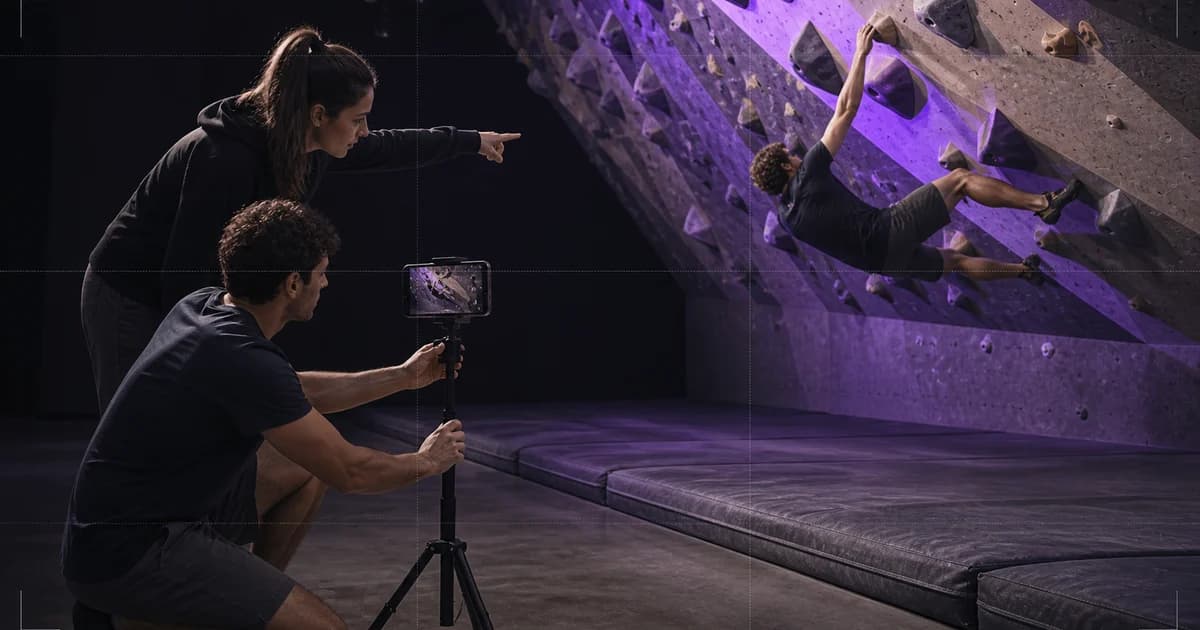
Bouldering AI: Coach: A useful bouldering review starts before you press record. You need a stable camera, enough space, a visible full movement, and a note that tells you what you were trying to do. The checklist keeps the clip useful without turning one automated observation into a verdict.
Use this checklist before you ask the app to interpret a clip.
1. Set up the recording
Place the phone outside the movement area and choose an angle that shows the full bouldering action. Keep the light steady, leave room around the athlete, and film the start and finish. If the camera hides the relevant joint, foot, hand, or hold, mark the clip as incomplete instead of guessing.
- Place the phone on a stable support outside the movement path.
- Keep the entire movement, relevant equipment, and the athlete’s starting position in frame.
- Film the complete attempt, not only the moment that failed.
- Write the drill, variation, round, wall, or goal beside the file.
- Review one cue, then repeat the same camera setup.
2. Ask one technical question
Use the selected app to review body position, foot placement, hip angle, and movement efficiency. Ask one question that the clip can actually answer: what changed before the attempt broke, and what single adjustment can you test next? Keep the observation factual. A camera can show a position or sequence, but it cannot replace a qualified coach’s full context.
3. Record the next comparable attempt
Keep the wall angle, hold style, grade system, and attempt count beside the clip. Those details make a later project comparison more useful. Repeat the same framing for the next attempt. Change one cue, then record whether the movement looked different. Keep a note of the result even when the attempt still fails, because a failed comparison can tell you which variable did not change.
4. Check the clip against the wall
Watch the recording once without pausing. Confirm that the camera shows the starting position, the relevant holds, both feet, the hips, and the finish. Watch it a second time with one question in mind. Did your hips move away from the wall before the foot slipped? Did you spend an extra attempt because you changed feet without a plan? Did the crux demand a different body position than the one you prepared?
Write the answer as an observation rather than a label. “Left hip opened before the right foot moved” gives you a testable cue. “Bad technique” gives you no test. If you climb under a different wall angle or with a different hold style, start a new comparison instead of treating the clips as identical. You can keep the same project grade and attempt log while making the changed context visible.
5. Keep the review honest
Do not move the phone closer after a failed attempt just to make the movement look larger. Do not crop out a foot that changed the sequence. Use a safe filming position outside the landing area, ask a training partner to confirm the camera does not interfere with the session, and stop the review when the camera cannot see the relevant movement.
The goal is a useful next experiment. Let the clip answer one question, let the app organize the visible evidence, and let your coach or session plan decide how much work belongs in the next attempt.
Keep the original clip and the follow-up clip together. A short note about the wall, the problem, and the adjustment lets you revisit the decision without relying on memory. If your camera position changes, say so. Honest context makes the review more valuable than a polished clip that hides what changed.
Use a simple session tool
Use the climbing grades tool or climbing plan tool to keep the project note beside the clip.
Review the clip in the selected app
After the checklist, open Bouldering AI: Coach. Record or import one comparable clip, review body position, foot placement, hip angle, and movement efficiency, and save one concrete cue for your next attempt. For a sport-specific explanation of this video workflow, continue with the full video analysis guide.
Sources
Final answer
Use Bouldering AI: Coach when you want a bouldering clip to lead to one visible observation and one next-session adjustment.
Train Bouldering with AI
Bouldering AI reviews your technique, helps plan training, and tracks nutrition. Check the App Store for current access terms.