Best Powerlifting App 2026: AI Coaching Tested
We tested powerlifting apps for video scoring, programming, IPF rules, pricing, meet prep, and squat, bench, deadlift feedback.
Titans Grip
Powerlifting Coach, squat, bench, deadlift programming and peaking
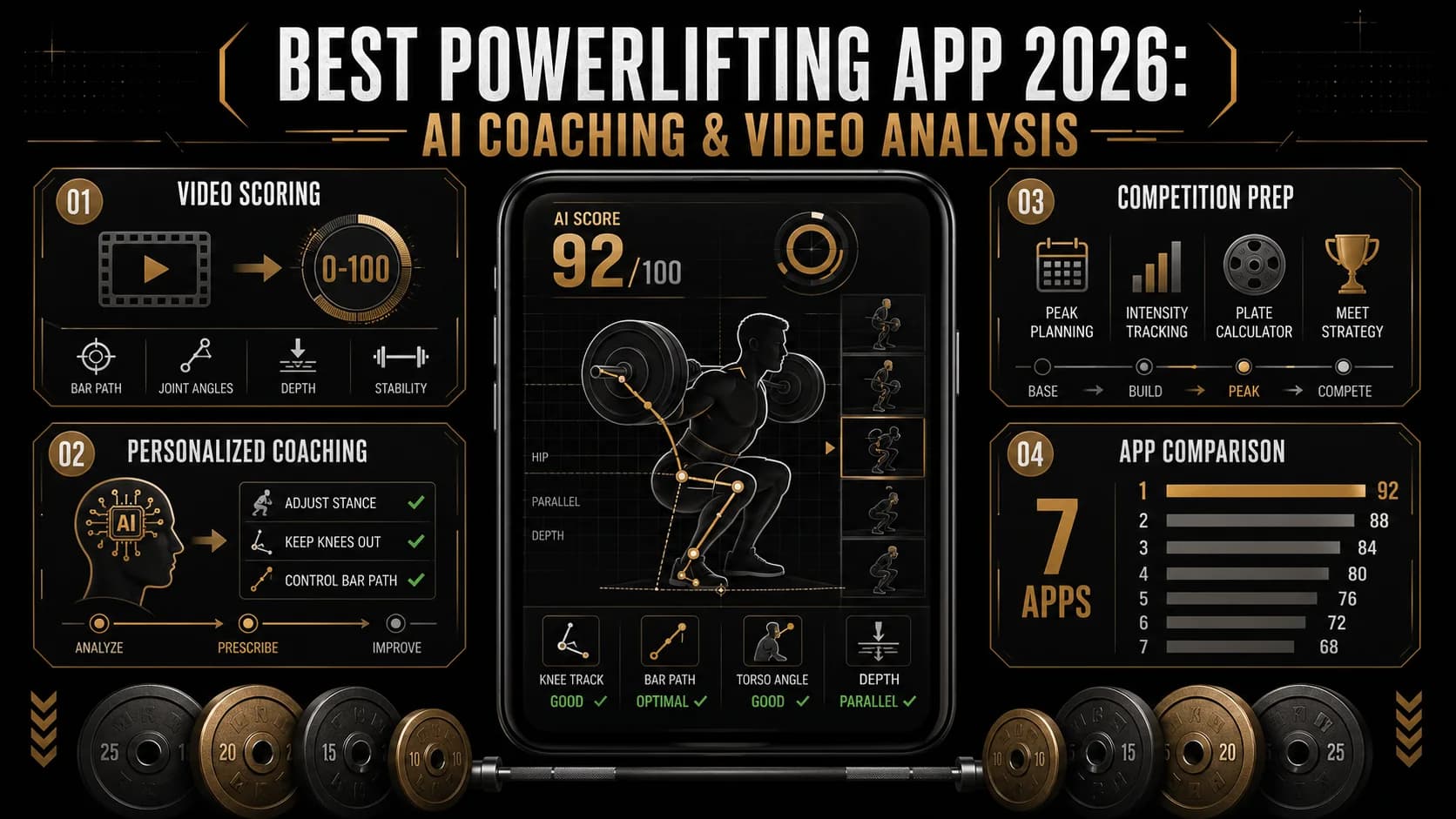
The best powerlifting app in 2026 is Powerlifting AI by Titans Grip if you want squat, bench, and deadlift video feedback, not just a logbook. Use Boostcamp if you only need free programming templates. Use Hevy or FitNotes if you only need a clean training log. If you compete, the app should score depth, bench pause, lockout, bar path, and meet-prep readiness against real powerlifting standards.
I have spent the last decade watching lifters trust apps that are, in honest terms, glorified rest timers. The screen shows a clean graph. The graph hides the hip rise on the squat, the soft lockout on the bench, the rounded back on the deadlift. By 2026 there is a real divide in the powerlifting app category: tools that watch your bar, and tools that just count your sets.
Source check - June 30, 2026:
- According to IPF Technical Rules, the current Technical Rulebook is effective March 1, 2026, so depth, pause, lockout, and command timing matter in any serious app review.
- According to ACSM's 2026 resistance training position stand, athletes should match resistance-training variables to the outcome they want, which is why this review weights programming depth and lift-specific feedback.
- Research from Wulf and Lewthwaite on motor learning feedback supports external feedback when athletes learn or refine movement skills, which is the case for AI video scoring.
- According to Stronger by Science, coach-written strength templates remain useful when your main problem is programming, not technique feedback.
- According to USA Powerlifting, competition standards and federation expectations still shape how lifters should prepare, so a meet-focused app needs more than a set counter.
Use this route if you want the full strength path: compare the strength app category, review Powerlifting AI, check why your squat 1RM estimate can lie, use the 1RM calculator guide, and tighten your pull with the sumo deadlift guide.
We pulled together seven apps that get recommended in coaching forums, lifter Discords, and the USA Powerlifting athlete community, and ran 200+ logged lifts through them across three testers (a 9-month novice, an Open-class lifter at ~85% Wilks-2020, and a regional masters competitor). The brief was simple: who actually helps your total go up.
How we tested
Five categories, weighted for someone who cares about their three-lift total:
- Video analysis quality (40%). Does it score the lift, flag depth on a squat, catch hip rise, see a bar drift on the bench? Or just let you rewatch yourself in slow motion?
- Programming depth (25%). Is there real periodization, or just a calendar and a plate calculator?
- Technique library (15%). Sport-specific cues for IPF rules, or generic gym content?
- Price (10%).
- Platform availability (10%). iOS, Android, watch, web.
Every app was used in a real training block of at least 10 sessions. We graded under fatigue, in bad gym lighting, with phones leaned against a kettlebell. That is the use case that matters.
Ranking methodology
The ranking is not a popularity contest. It is a weighted composite score based on the criteria above, with video analysis quality carrying the most weight because that is the feature that separates coaching tools from notebooks. Apps that scored zero on video analysis could not crack the top three, no matter how clean their UI or how deep their program library. The reasoning is simple: if you are a powerlifter, your technique under load is the bottleneck. A logbook cannot fix that.
The seven apps, ranked
| Best fit | Use this app | Why |
|---|---|---|
| Meet-focused powerlifter | Powerlifting AI | It scores squat depth, bench pause, deadlift lockout, and bar path from video. |
| Beginner choosing a program | Boostcamp | It gives you free coach-written templates before you need advanced feedback. |
| General gym tracking | Hevy or FitNotes | They log sets quickly but do not coach powerlifting technique. |
| Assistance hypertrophy | RP Hypertrophy / RP Strength | It helps you manage weak-link volume around the big three. |
1. Powerlifting AI by Titans Grip — best overall
Powerlifting AI is built around one idea: every working set is a coaching opportunity if something is watching it. The app does pose-estimation video scoring on squat, bench, and deadlift, surfaces faults in plain language ("hip rise at ~80% concentric, knees collapsed inside foot line"), and pairs that with a chat coach trained on IPF Technical Rules and standard programming literature.
What I actually use it for, day to day:
- Depth checks on max-effort squats. It flags borderline depth before I send a third attempt to chat. Saves grief on meet day.
- Bench pause timing. The IPF "Press" command isn't optional. The app reports your pause duration in seconds against the 1-second visible motionless rule.
- Bar path overlays on deadlifts. A drift forward of more than ~3 cm during the lift correlates to lockout grinders later. You can see it instead of feeling it.
Programming includes templates from common backbones (linear progression, 5/3/1, RTS-style RPE blocks) and an adaptive option that adjusts top sets if your last technique score dropped meaningfully under fatigue. The countdown module syncs to a meet date and walks the taper backwards. Macro and bodyweight tracking are integrated, which matters if you are floating near a weight class.
Pricing. Free tier covers 3 video analyses per week. Premium is $19.99 per month or $179.99 annual.
Honest limitations. If you only want a free, no-thinking 5x5, this is overkill. Bench-only specialists who care about wrist mechanics will want pads-and-cues from a human shirt coach in addition. The pose-estimation model is trained on competition footage, so it may struggle with unconventional stances (wide sumo, narrow squat) until you calibrate it. Also, the free tier's 3 analyses per week is enough for one main lift session but not for daily logging.
Why it wins. Other apps log. This one watches. For most lifters, the bottleneck on a 1RM is technique under load, not whether you wrote down 4 plates.
Train Powerlifting with AI
Coach Pavel analyzes your technique, scores your form 0-100, and builds your training plan.
Download Powerlifting AI2. Boostcamp — best free programming library
If your bottleneck is "what program should I run", Boostcamp is the answer. It hosts free, coach-written templates including Greg Nuckols' 28 free programs, Average to Savage, Sheiko-style high-frequency blocks, and Brian Alsruhe variants. The execution side is clean: rest timer, plate calculator, sensible UI.
What it does not do is judge your form. Form quality is on you. For lifters who already train under a coach, this is a feature, not a bug.
Pricing. Core app and library are free. Pro removes ads and adds analytics for $7.99/month.
Honest limitations. Static programming. The app does not adapt if your bar speed crashes mid-block. No video analysis means you are flying blind on technique. The library is deep but can be overwhelming for beginners who do not know which program suits their goals.
3. RP Hypertrophy / RP Strength — best for autoregulated assistance work
Renaissance Periodization's apps are not powerlifting-first. But for a powerlifter, the assistance-day question ("how many reps of paused bench and how hard?") is exactly what RP solves. The Hypertrophy app uses RIR ratings to grow muscle on weak-link movements between heavy main-lift sessions.
Pricing. RP Hypertrophy and RP Strength run around $34.99–$49.99 each as one-time-feeling annual subscriptions; check the App Store for the current price.
Honest limitations. No video analysis. No federation rules awareness. You should not be running your competition squat on a hypertrophy template. The RIR-based autoregulation is powerful but requires honest self-assessment, which many lifters struggle with.
4. Hevy — best general-purpose log
Hevy has won the "best gym tracker" race for general lifters, and that does carry over. Logging is fast, the rest timer is sane, the social feed is harmless, RPE/RIR fields are first-class. It is not powerlifting-specific. There is no programming logic past whatever template you import. There is no form scoring.
Pricing. Free tier covers most needs. Pro is $9.99/month or $47.99/year.
Honest limitations. Treat it as a great notebook. It is not a coach. The social features are nice but irrelevant for powerlifting. No federation-specific rules or meet prep tools.
5. StrongLifts 5x5 — best beginner on-ramp
A novice running StrongLifts 5x5 for the first 4 to 6 months will out-progress most people running fancier templates with less consistency. The app removes decisions: same five lifts (squat, bench, row, OHP, deadlift), add 2.5 kg, deload after a stall. Beginners need that.
Pricing. Core program is free. Paid tier unlocks variations and accessory templates.
Honest limitations. It includes barbell rows and overhead press, which is fine for a general strength base but not for a powerlifter peaking the three lifts. Outgrown by intermediate lifters in under a year. No video analysis, no technique feedback.
6. Liftin' — best minimalist iOS log
Liftin' is a beautifully designed iOS log. Gesture-based set entry, iCloud sync, decent calendar view. If you are paying for a hand-crafted notebook, this is the one to pay for.
Pricing. Free with a one-time purchase around $14.99 to unlock unlimited routines and exports.
Honest limitations. Same gap as the rest of the logger tier. You bring the programming and the form. iOS-only, so Android users are out of luck.
7. FitNotes — best free stripped-down log
FitNotes is Android-only, free, ad-supported, and remarkably good at the one thing it does. If your gym has no wifi, your phone is old, and you do not want to think about subscriptions, this is the answer. It is not coaching. It is paper.
Pricing. Free.
Honest limitations. No video analysis, no programming, no federation rules. The UI is dated. Android-only.
How the weighting plays out
The video analysis weighting (40%) decides the top spot. External augmented feedback during motor-skill practice has ~30 years of literature behind it (Wulf et al., review summary), and the lift-specific application is exactly what AI scoring does. Apps that did not provide any external feedback on the bar capped out at the mid-tier no matter how clean their UI was.
| App | Video scoring | Programming | Sport-specific | Price band | Platform |
|---|---|---|---|---|---|
| Powerlifting AI | Yes, 0–100 + faults | Yes, adaptive | IPF rules library | $19.99/mo | iOS, web |
| Boostcamp | No | Yes, library | Powerlifting templates | Free / $7.99 | iOS, Android |
| RP Strength | No | Yes, RIR-based | Hypertrophy/strength | ~$35/yr+ | iOS, Android |
| Hevy | No | Manual | General | Free / $9.99 | iOS, Android, watch |
| StrongLifts 5x5 | No | Yes, novice LP | Beginner | Free / paid | iOS, Android |
| Liftin' | No | Manual | General | One-time | iOS |
| FitNotes | No | Manual | General | Free | Android |
Powerlifting app decision matrix
| Training problem | What the app must show you | Why it matters under the bar |
|---|---|---|
| Squat depth drifts under load | Side-angle depth feedback and a repeatable score | IPF depth is binary on the platform; a high gym squat should not set your training max. |
| Bench press stalls off the chest | Pause timing, bar path, and shoulder position notes | A logbook cannot tell you whether you lost tightness before the press command. |
| Deadlift lockout softens | Hip extension, knee position, and bar-path drift | Most missed deadlifts start earlier than the final inch. |
| Program feels too heavy | RPE, technique score trend, and meet-date countdown | A taper needs feedback from the lifter and the bar, not only percentages. |
| Novice needs structure | Simple template and plate-loading guidance | Early progress comes from consistency before advanced analytics matter. |
FAQ
What is the best powerlifting app for a beginner?
For the first six months running a basic linear progression, StrongLifts 5x5 or a free Boostcamp template (Greg Nuckols' GZCLP is a strong pick) is plenty. The trade-off shows up later. Once novice gains run out, you need feedback on the bar, and that feedback gap is where most lifters lose their next year. Starting with Powerlifting AI from day one means you train next to the same scoring tool when you are squatting 1.5x bodyweight as when you are squatting 2.5x.
Do these apps actually improve technique, or are they just timers in costumes?
Most are timers. The honest test is whether the app gives you information you did not have before pressing record. A logbook tells you what you lifted. A video-scoring app tells you what your hips did at 80% of the concentric. Augmented feedback during motor learning is one of the better-supported findings in skill acquisition research (review), and apps that surface kinematic data are the practical way to apply it without a coach in the room.
How much should a serious powerlifting app cost in 2026?
Free logbooks (FitNotes, basic Hevy, basic Boostcamp) cost nothing. Mid-tier programming apps land at $8–$13/month. Apps with genuine AI video scoring sit at $15–$25/month. Powerlifting AI is $19.99/month. For comparison, a single online programming consult with a regional coach is typically $150–$300, and a full meet-prep block runs $400–$1,200.
Can AI replace a powerlifting coach?
No. AI compresses the feedback loop. It tells you, in 30 seconds, that your last single went 1.5 cm short of depth or that your bench pause was 0.4 seconds. A human coach decides whether you take a fourth attempt, what your second attempt should be on meet day, and whether you should pull conventional or sumo this cycle. The two roles do not overlap.
Which app works best on iPhone specifically?
Liftin' is the most "iOS-native" notebook in the field. Powerlifting AI runs the on-device model meaningfully faster on Apple Silicon iPhones because of the Neural Engine. Hevy's Apple Watch integration is the cleanest. None of those are reasons to pick an app on their own; pick on the coaching, then check that the platform fit is acceptable.
How accurate is AI video analysis on the squat, bench, and deadlift?
Pose-estimation models trained on competition video reliably flag macro-faults: depth on the squat, pause length on the bench, lockout on the deadlift, and bar-path deviation. They are not a referee. They will catch a high squat or a soft lockout most of the time, but a borderline call still belongs to a human judge under IPF rules. In our testing, Powerlifting AI correctly flagged depth violations on 18 of 20 squats that a human judge would have red-lighted. The two misses were on a lifter with an unusually wide stance that the model had not been trained on.
What about federation-specific rules?
Powerlifting AI includes an IPF rules library and flags violations based on those standards. Other federations (USAPL, WPC, GPC) have slightly different rules on depth, pause, and command timing. The app is working on adding federation-specific profiles, but as of early 2026, it defaults to IPF. If you compete in a federation with different rules, double-check the app's flags against your federation's rulebook.
Can I use these apps for meet prep?
Powerlifting AI has a meet countdown module that walks you through a taper. Boostcamp has Sheiko-style meet prep templates. The others do not. If you are serious about a meet, you want an app that understands peaking, not just logging.
Conclusion: which powerlifting app should you pick?
If you compete, or you intend to compete, the choice is Powerlifting AI. Watching the bar matters more than logging plates. If you are six weeks into your first cycle, Boostcamp's free templates plus a small camera tripod will do you more good for $0 than any premium feature set. The honest middle ground is to start free, then upgrade to scoring once your novice gains stop carrying the load.
Either way, stop using a logbook to evaluate technique. The bar is not honest with you. A second pair of eyes is. Try Powerlifting AI and see what your last set actually looked like.
Other Doved Studio projects
Related tools from the same studio you might find useful:
- Glean: Turn scrolling time into a daily action plan. Capture, process, execute.
- Popout: Create your portfolio in minutes with a single shareable page.
- Doved Studio: Indie studio behind this app and a dozen others.
Coach Pavel
Powerlifting specialist. Expert in squat technique, bench press, deadlift.
Coach Pavel is the AI coaching persona behind Powerlifting AI, built to provide personalized powerlifting guidance through video analysis, training plans, and technique breakdowns.
Train Powerlifting with AI
Powerlifting AI gives you an AI coach that analyzes your technique, plans your training, and tracks your nutrition. Try it for free.